Nextjs
This article is a culmination of learning on a 6 week ‘bet’ of mine where I wanted to push foward with learning more on Next.js
I’m envisaging running SaaS products using this tech
The output in a project called https://github.com/djhmateer/minimal-nextjs
Here is the sample app running on my ‘prod’ server internally.
- App Router Patterns (this is a tricky area and no real correct ways)
- React Hook Form
- Zod
- No caching
- Better Auth for username and password login, and simple protected page.
- Postgres 16
- Page, Filter and Sort table of 1million rows
- Modal popup for editing
I lot of the app was generated using claude code. And understanding/refactoring every line that was generated.
This is a rough article at the moment.
I’m very happy with the result of this bet
- Know my ‘new tech stack’ going forward
- Can use the JS goodness of React for forms, interactions..
- Have a simple, performant app with which to base my next ‘bet’ which is all about products
Background
I’m building a greenfield app in 2025. I will probably need React on the frontend for some parts of the app to do complex forms and to use the design system shadcn/ui. Other parts of the system are simple CRUD and don’t need react. I’d like to host on a VM and have a database. What are my options?
what about other design systems that aren’t shadcn/ui?
Foo
https://chatgpt.com/share/68d54d0f-0080-8006-a294-650b0b1e9c00
`In next.js or astro, when should one use React and when should one use a server based data fetching / html generational model?
I’ve used server side frameworks for years such as asp.net, php, ruby on rails. Hosted on a single VM with a separate DB, they can handle huge loads and are easy to debug.
With the advent of react and client side framworks which make javascript interacticity easy they are very commong.
Firstly why should one use React? What are they parts of a CRUD based application that it shines in?`
When React is the right tool
React shines anywhere your UI has long-lived client state or rich interactions that would be clumsy as full page reloads.
Sweet spots in CRUD apps
-
Inline editing & optimistic UI Editable tables, drag-to-reorder, multi-select with bulk actions, undo/snackbar flows.
-
Complex forms. Conditional fields, debounced validation, nested arrays (e.g., invoices with line items), rich editors, wizards.
-
Realtime views. Presence indicators, live counters, notifications, collaborative cursors; WebSocket/SSE hooks.
-
Reusable design systems. Where a component library and composition pay off across the app.
If a screen is mostly read → click → navigate, React is often overkill.
How to use Next.js
If we need React (and I’d argue it is necessary for most modern day apps)
https://chatgpt.com/share/68d62c71-f5ac-8006-b689-5bf33bfcd055
For small teams lets flatten the stack:
- Server-first to prevent edge cases, cache revalidation, hydration drift
- VM hosting allows simple logs
- Keep client JS minimal and intentional
Minimal Next.js stack
As with other stacks where I’ve been frustrated by complexity (well, frustrated by my own lack of knowledge usually!), lets take the good parts of Next.js and make a great simple stack.
With .NET I found an incredible sweet spot which made developing apps a breeze. I wrote a massive blog post series, and understood the stack well.
- No caching
- No massive ORM (Entity Framework!) but favour simplicity like Dapper
- Migrations I didn’t even use
- Keep layers of abstration as simple as possible ie usually only 1 db.cs import (along with global auth)
- Self host so I can reliably deploy (with a bash script to build) and have massive performance.
So with Next.js I wonder
- Server Side Rendering
- No caching
- Self host on raw VM - just use nginx and node (using pnpm)..systemd.. zero downtime deploy with sym link so can revert.
- Postgres
- Shadcn/ui for pre-built great looking components
Self Host
https://nextjs.org/docs/app/getting-started/deploying
https://medium.com/upcloud/how-to-deploy-next-js-to-cloud-servers-a-step-by-step-guide-bb078bfff6f4
In the spirit of just code.. and get something working..
- Create a self hosted VM
- bash script to install everything needed for Next.js
- run a deployment straight to the Next.js server (no nginx yet)
# Node Version Manager - nvm

# https://github.com/nvm-sh/nvm
# check the version number and put below. This is an update script as well
curl -o- https://raw.githubusercontent.com/nvm-sh/nvm/v0.40.3/install.sh | bash

# restart shell or
export NVM_DIR="$HOME/.nvm"
[ -s "$NVM_DIR/nvm.sh" ] && \. "$NVM_DIR/nvm.sh"  # This loads nvm
[ -s "$NVM_DIR/bash_completion" ] && \. "$NVM_DIR/bash_completion"  # This loads nvm bash_completion


# 0.40.3 on 29th Sept 25
nvm -v

## node 22.20.0 on 12th Oct 25
## 24.11.0 on 30th Oct 25
nvm install --lts

node --version

# new way ie don't use npm to install pnpm
corepack enable
corepack prepare pnpm@latest --activate

# 10.20.0 on 30th Oct
pnpm update

# 10.9.3
# npm -v

# update npm.. now 11.6.1 on 29th Sept 25
# npm install -g npm

# **TODO - a better more direct way on installing pnpm? so can update more easily**
# 10.17.1
# npm install -g pnpm


cd /var/www
git clone

# pnpm install
pnpm i

# pnpm update
# update all packages to latest..hmm react-dom from 19.1.0 to 19.1.1
pnpm up --latest

# Nginx
sudo apt-get install nginx -y

# service
mkdir /srv/

sudo git clone https://github.com/djhmateer/minimal-nextjs.git

sudo git clone https://github.com/patrickbower/spotscore.git

# fatal: detected dubious ownership in repository at '/srv/spotscore'
git config --global --add safe.directory /srv/spotscore
sudo git checkout dave

## chown to a deploy user?

sudo chown -R www-data:www-data /srv/minimal-nextjs
sudo chown -R www-data:www-data /srv/spotscore

# sudo chmod +x /srv/minimal-nextjs/
sudo chmod 777 /srv/minimal-nextjs/

# so can create node_modules etc.
sudo chmod 777 -R /srv/spotscore

pnpm i
pnpm run build


# for if git folder has a different owner ie www-root
sudo git config --global --add safe.directory /srv/minimal-nextjs

# nginx is on my reverse proxy
#sudo cp /srv/minimal-nextjs/infra/nginx.conf /etc/nginx/sites-available/default

# test the config
# sudo nginx -t

# sudo nginx -s reload

# systemd or pm2

# manual testing - run the next start server as defined in package.json
pnpm -- start

# test process is running
curl -I http://127.0.0.1:3000
then following the automated installation
# 15.5.4 on 29th Sept 25
# https://nextjs.org/docs/app/api-reference/cli/create-next-app
# pnpx create-next-app@latest minimal-nextjs --ts --eslint --tailwind --no-src-dir --app --turbopack --no-import-alias --use-pnpm

pnpx create-next-app@latest dave_app --ts --biome --tailwind --no-src-dir --app --turbopack --no-import-alias --use-pnpm

cd minimal-nextjs

# post install scripts
# tailwindcss_oxide
# unrs-resolver
# sharp
pnpm approve-builds

# http://localhost:3000/
pnpm dev
Testing locally
I don’t have any domain names at the moment, so lets just hit the webserver locally by ip
pfsense2 is on 192.168.1.179 :8080 is pfsense
:80 is just the default reverse proxy ie pfsense forwards to 172.16.44.104 (NGINX-RP)
how about pfsense redirects port 81 to 172.16.44.130:3000
http://192.168.1.179:81/
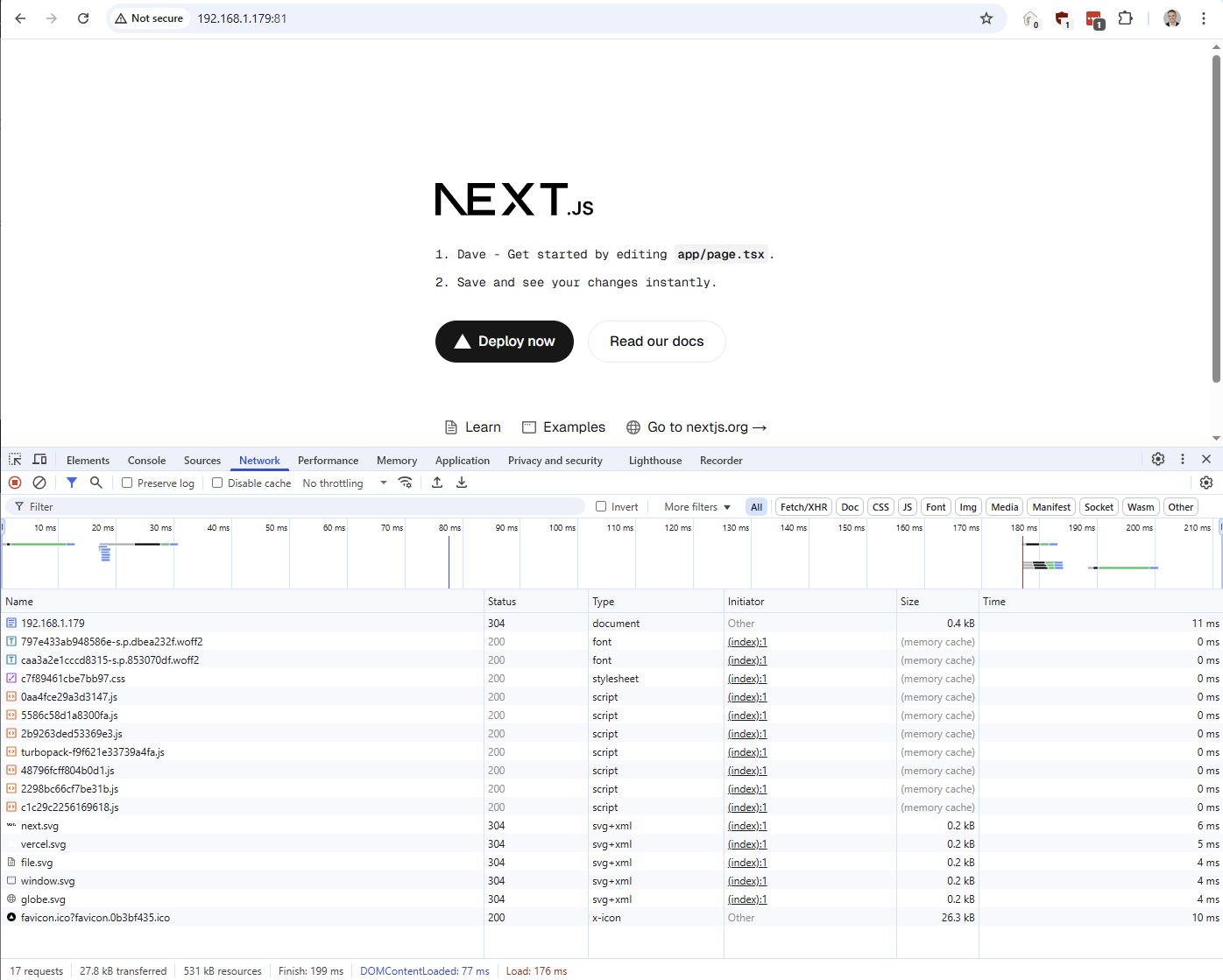
A production build of a sample next.js project.
js is cached well in browser
I changed a file to Dave2 in source, then on the sever
# 9 seconds to lint, build and start on desktop and server
pnpm build
pnpm start
pnpm lint
Node.js
When run pnpm run build it runs next build which
- Transpiles TS/JSX
- Bundles client-side assets
- Prepared .next/ directory with optimised output
- Runs static optimisation and prerenders any SSG pages
- Prepares server code for SSR routes
pnpm start
- Runs
next start- next.js’s minimal Node server that uses build output in.next/. Internally known asNextNodeServer - serves prebuilt static assets
- handes SSR (Server Side Rendering)
- provides routing based on the filesystem and middleware
Filesystem
I got Turbopack’s filesystem benchmark of 136ms warning. The disk iops on my hypervisor were going hard with other work. ZFS on RAID1.
todo - boot my filesystem
Middleware for logging
I like to see everything on the server
import { NextResponse } from 'next/server'

export function middleware(request) {
  const start = Date.now()

  const response = NextResponse.next()
  const duration = Date.now() - start

  console.log(`${new Date().toISOString()} - ${request.method} ${request.nextUrl.pathname} - ${duration}ms`)

  response.headers.set('x-response-time', `${duration}ms`)

  return response
}

// defines which paths will invoke the middleware
//   - /(...) - Match paths starting with /
//   - (?!_next/static|_next/image|favicon.ico) - Negative lookahead: Don't match these patterns
// also svgs
//   - .* - Match everything else
export const config = {
  matcher: '/((?!_next/static|_next/image|favicon.ico|.*\\.svg).*)',
}
and
#!/bin/bash

echo "Step 1: Pulling latest changes..."
git pull

echo "Step 2: Building application..."
step_start=$(date +%s)
pnpm build
step_end=$(date +%s)
echo "Build completed in $((step_end - step_start)) seconds"

echo "Step 3: Starting application..."

# Have got middleware.js for logging on prod
pnpm start

# noisy
# DEBUG=next:* pnpm start

# still noisy
# DEBUG=next:router-server:main pnpm start
and now we have logging.. can’t get response code due to limitaion on middleware logging. https://news.ycombinator.com/item?id=45099922
I’ll be logging via nginx in prod.
Biome
https://biomejs.dev/guides/getting-started/
# same as pnpm run lint
pnpm exec biome check

# apply safe fixes
pnpm exec biome lint --write

# same as pnpm run format
pnpm exec biome format --write
In VSCode I had to put in the path as I’m using a subdirectory dave_app/node_modules for my app.
// /.vscode/settings.json
{
  "biome.lspBin": "./dave_app/node_modules/@biomejs/biome/bin/biome"
}
SSR (Server Side Rendering)
SSG - Server Side Generated (ie ‘static’ and not good for db calls)
// app/page.tsx

export const dynamic = 'force-static'

const Homepage = () => {
  const currentTime = new Date().toLocaleString();

  return (
    <div className="p-4">
      <h1 className="text-2xl mb-4">Home</h1>
      <p>this data is the next.js default of statically generated on the server - Server Side Generated. Build time: {currentTime}</p>
    </div>
  );
};

export default Homepage;
SSR - Server Side Rendered.. async by convention.
// app/about/page.tsx

export const dynamic = 'force-dynamic';

// note async!
const AboutPage = async () => {
  const currentTime = new Date().toLocaleString();

  return (
    <div className="p-4">
      <h1 className="text-2xl mb-4">About</h1>
      <p>build time is (ie page data is Server Side Rendered on each request {currentTime}</p>
    </div>
  );
};

export default AboutPage;
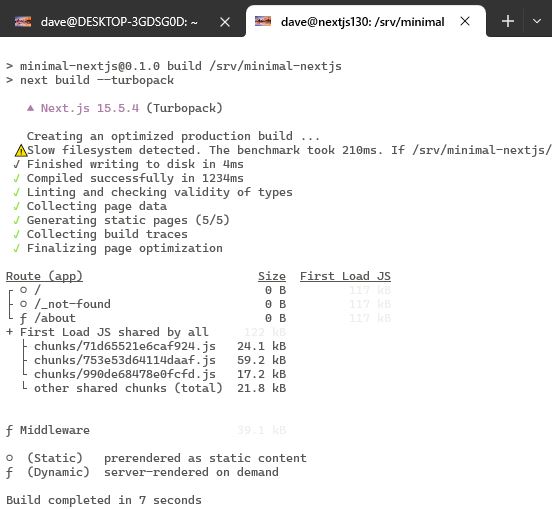
pnpm build output shows which routes are dynamic and which are static.
Server and Client Components
By default layouts and pages are Server Components.
Server vs Client Components is determined by “use client” directive - No “use client” = Server Component (your case) - Has “use client” = Client Component
export const dynamic controls when/how the component renders on the server: - ‘force-static’ = Pre-rendered at build time (SSG) - ‘force-dynamic’ = Rendered on each request (SSR) - ‘auto’ = Next.js decides
When you navigate between routes, Next.js unmounts the current page component, an mounts the new one. So that is why the state returns to 0 after clicking away.
Could use localStorage, or state in the layout component as this stays mounted.
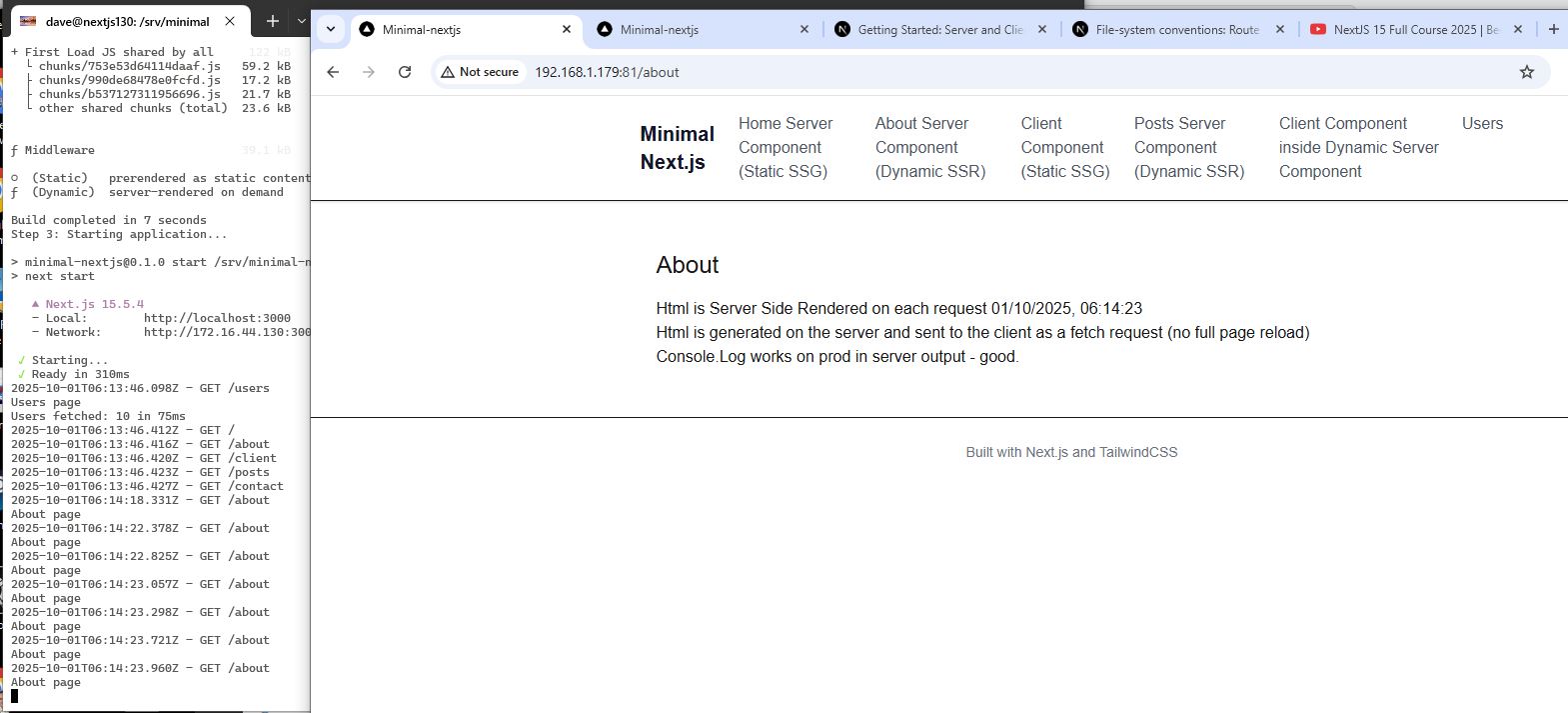
minimal-nextjs shows a good flow of understanding concepts. Having a production server vm is invaluable
Params
Param ie /users/1
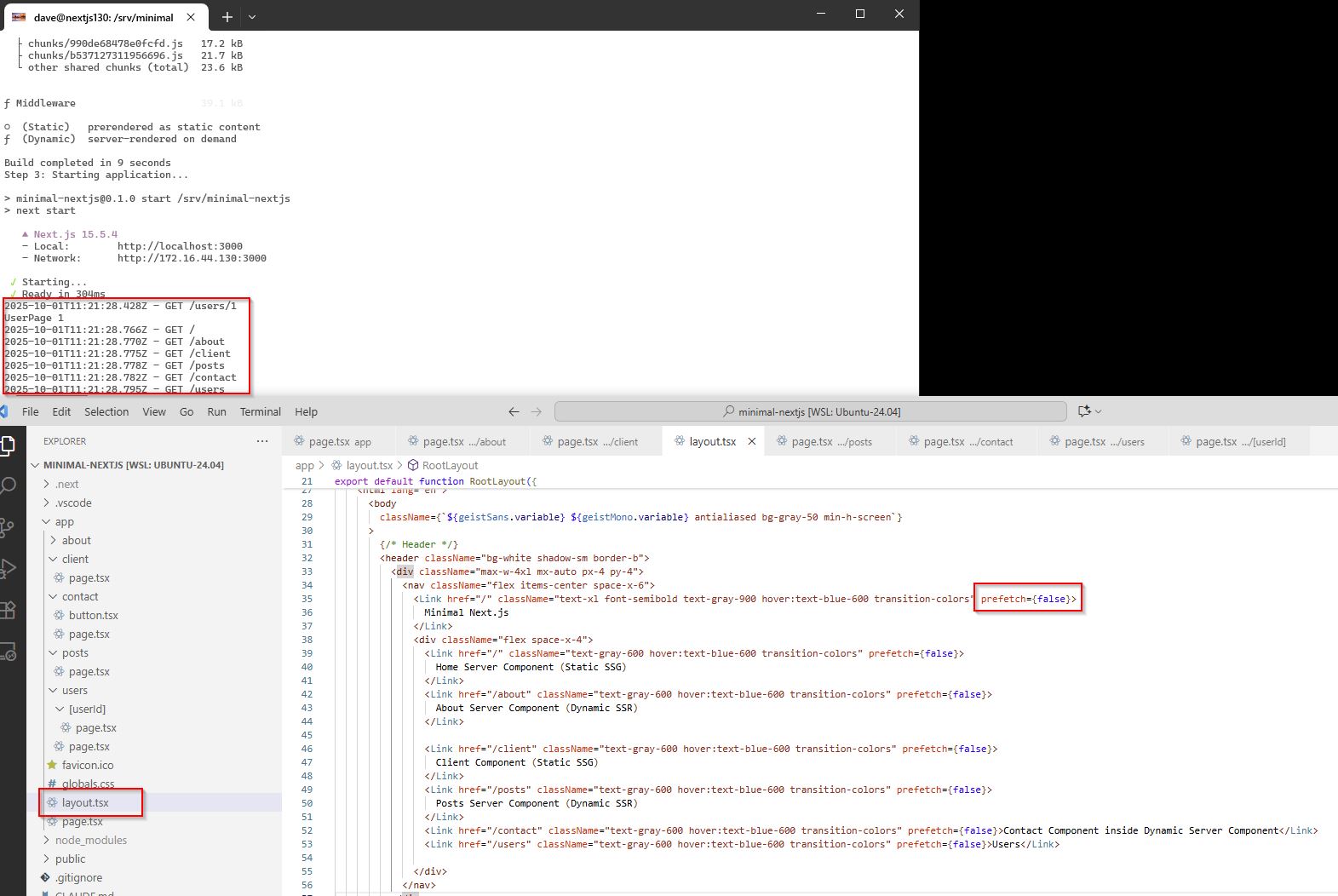
To stop prefetch when I’m on /users/2 I set all links to prefetch={false}
Custom 404
not-found.tsx
Loading State
loading.tsx
The loading.tsx file only appears when Next.js is waiting for the Server Component to finish rendering… so it doesn’t work when waiting for data over the wire?
It is a client component, so will be cached on the client.
I have seen it fail for no apparent reason.
I’ve got a global loading.tsx page which I testing.
DB
spin up postgres on dev and live server.
18 is most recent on 25th Sept 2025 https://www.postgresql.org/download/linux/ubuntu/
# postgressql16 on 1st Oct 2025 on standard repo.
# -contrib is extra utilities like uuid-ossp
# libpq-dev is client lib dev package.. do I need? eg python/ruby

# sudo apt install postgresql postgresql-contrib libpq-dev
sudo apt install postgresql postgresql-contrib

# 16.10 on 1st Oct 2025
psql --version

## prefer systemctl as service is just a thin wrapper on top
# on systemctl (service is maintained for backwards compatibility)
sudo systemctl enable postgresql
sudo systemctl start postgresql
sudo systemctl restart postgresql
sudo systemctl status postgresql

# previous service
# sudo service postgresql start
#sudo service postgresql restart
# sudo service postgresql status

# create a user
sudo -i -u postgres
psql
CREATE ROLE bob WITH LOGIN PASSWORD 'password' SUPERUSER;

# show all roles (users)
\du

\q
# Peer authenticaion failed for user bob
PGPASSWORD='password' psql -U bob -d postgres

# Lets switch to password auth on local connections
sudo vim /etc/postgresql/16/main/pg_hba.conf

# top line from peer to scram-sha-256 so I can connect from wsl2
local   all     all   scram-sha-256
# add at bottom of pg_hba.conf so I can connect from windows
host    all   all 0.0.0.0/0    md5

# change in postgresql.conf so I can connect from windows
sudo vim /etc/postgresql/16/main/postgresql.conf
listen_addresses = '*'

sudo systemctl restart postgresql

PGPASSWORD='password' psql -U bob -d postgres
psql -U bob -d postgres

# list dbs
\l
CREATE DATABASE test;

# 172.31.112.181 laptop, 172.23.16.249 desktop (both wsl instances)
# I've disabled my Ubuntu22 instance
hostname -I

# connect to db test
\c test

# test the connection
#psql postgresql://bob:password@localhost:5432/test

# show tables in public schema
\dt

CREATE TABLE users (
    id SERIAL PRIMARY KEY,
    username VARCHAR(50) UNIQUE NOT NULL,
    email VARCHAR(100) NOT NULL,
    created_at TIMESTAMP DEFAULT CURRENT_TIMESTAMP
);
for dev
# nice shortcut

# vim ~/.bashrc
export PGUSER=dave
export PGDATABASE=postgres

source ~/.bashrc

ALTER USER bob WITH PASSWORD 'password';
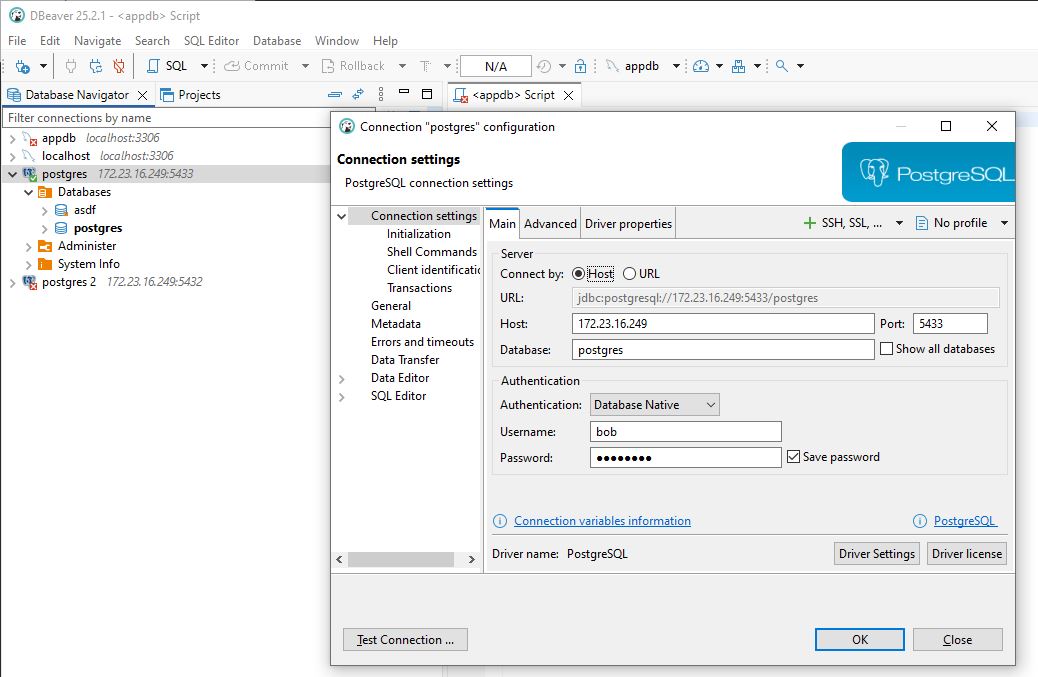
So this is it working on 5433 from Windows to WSL2 (where there is another WSL2 instance running postgres on 5432)
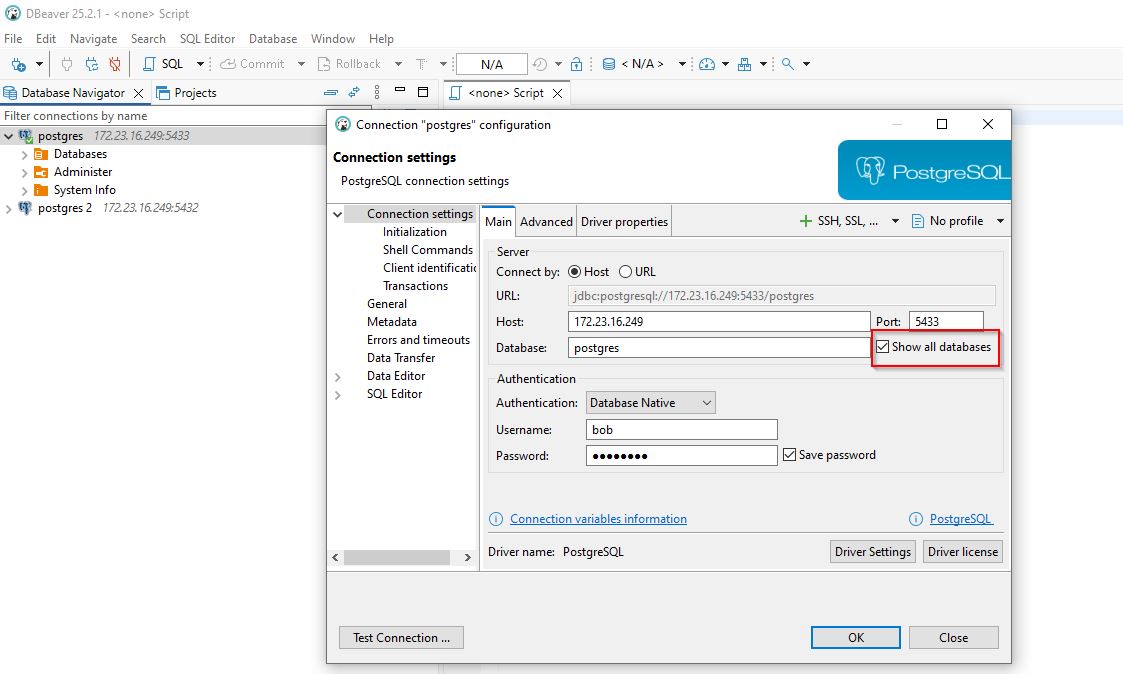
Remember to Show all databases.
Connect to DB from Next.js
db name is: minimal_nextjs (use underscores and not dashes)
CREATE TABLE public.users (
	id int GENERATED ALWAYS AS IDENTITY NOT NULL,
	"name" varchar NOT NULL
);

INSERT INTO public.users ("name")
VALUES
  ('Alice'),
  ('Bob'),
  ('Charlie'),
  ('Diana'),
  ('Ethan');

select * from users
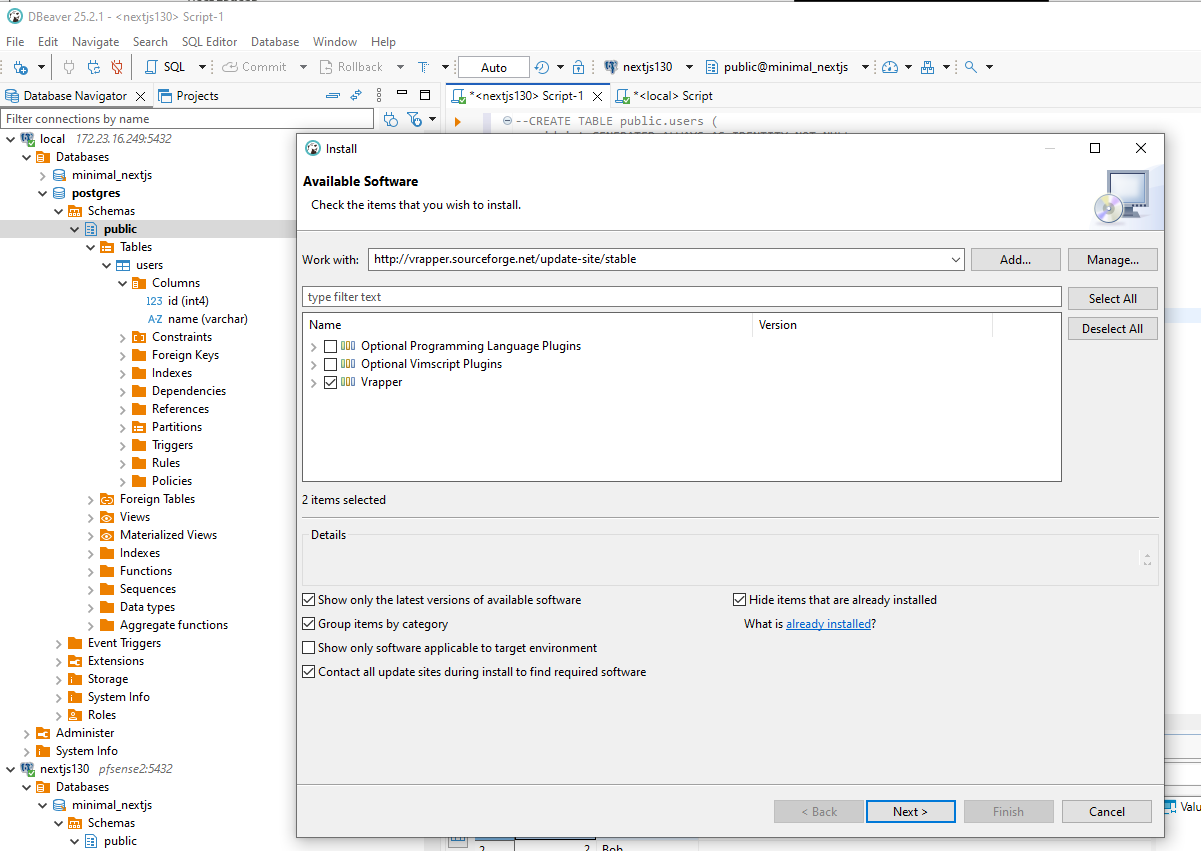
Installing vim keyboard bindings into eclipse
http://vrapper.sourceforge.net/update-site/stable
https://github.com/vrapper/vrapper
DB Success
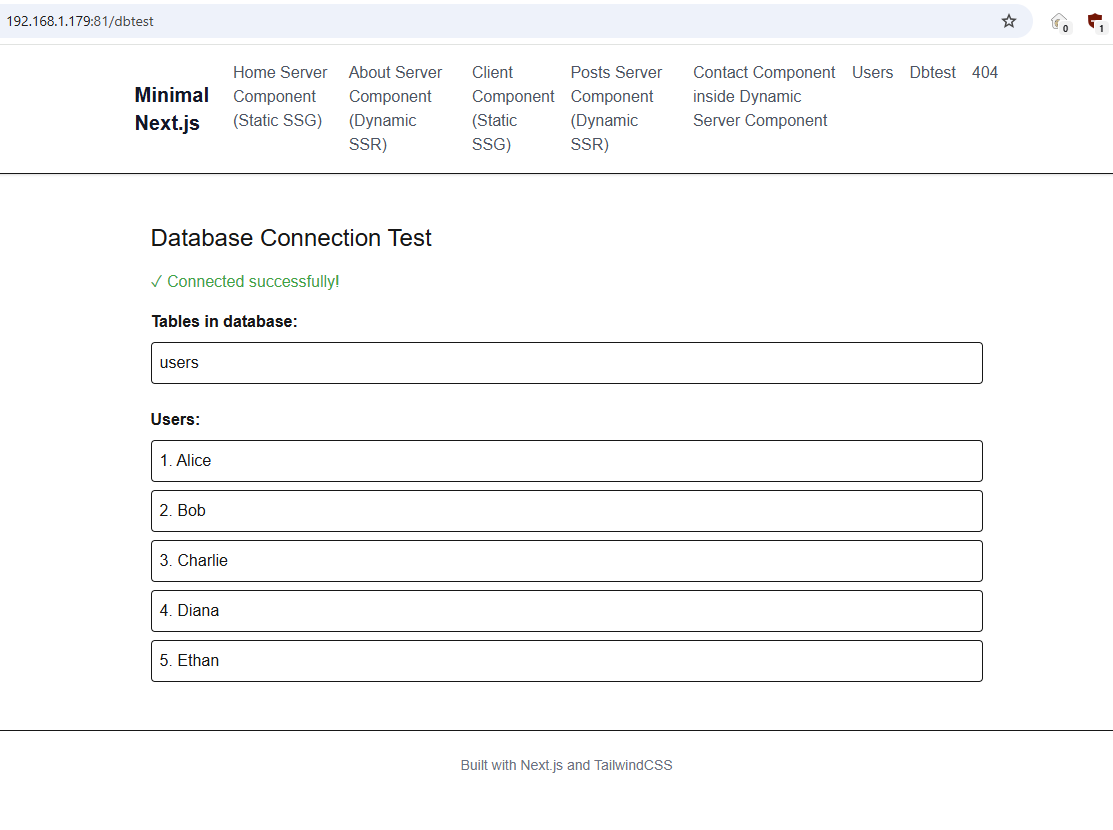
Database connection working on live and on dev
import { Pool } from 'pg';

export const dynamic = 'force-dynamic';

interface Table {
    tablename: string;
}

interface User {
    id: number;
    name: string;
}

export default async function Dbtest() {
    console.log('Dbtest page');

    const pool = new Pool({
        user: 'bob',
        password: 'password',
        host: 'localhost',
        database: 'minimal_nextjs',
        port: 5432,
    });

    let tables: Table[] = [];
    let users: User[] = [];
    let error = null;

    try {
        const tablesResult = await pool.query(
            "SELECT tablename FROM pg_catalog.pg_tables WHERE schemaname = 'public'"
        );
        tables = tablesResult.rows;
        console.log('Tables:', tables);

        const usersResult = await pool.query('SELECT * FROM users');
        users = usersResult.rows;
        console.log('Users:', users);
    } catch (err) {
        error = err instanceof Error ? err.message : 'Unknown error';
        console.error('Database error:', error);
    } finally {
        await pool.end();
    }
Shadcn/ui
A set of beautifully designed components that you can customize, extend, and build on
https://github.com/shadcn-ui/ui 96.6k stars
https://ui.shadcn.com/docs/installation/next
# 3.4.0 on the 8th Oct 2025
#  WARN  1 deprecated subdependencies found: node-domexception@1.0.0
# selected neutral

# added /components.json
# updated app/globals.css
# added lib/utils.js (cn - tailwind merge function)
# default on minimal-nextjs
# gray on spotscore
pnpm dlx shadcn@latest init


# added components/ui/button.tsx
pnpm dlx shadcn@latest add button
then to use:
export const dynamic = 'force-dynamic'

import { Button } from "@/components/ui/button"

export default async function ShadcnPage() {
  console.log('shadcn page')
  return (
    <div>
      <Button>Click me</Button>
    </div>
  )
}
shadcn to explore
https://ui.shadcn.com/examples/tasks - filter, sort grid…looks great.
shadcn mcp server
https://ui.shadcn.com/docs/mcp
// .mcp.json
{
  "mcpServers": {
    "shadcn": {
      "command": "npx",
      "args": ["shadcn@latest", "mcp"]
    }
  }
}
then if I do /mcp in claude it shows me the connected server.
Show me all available components in the shadcn registry
Add the button, dialog and card components to my project
Form with Claude-code and Shadcn
Create a contact form using components from the shadcn registry
It did
` pnpm dlx shadcn@latest add form input textarea card label `
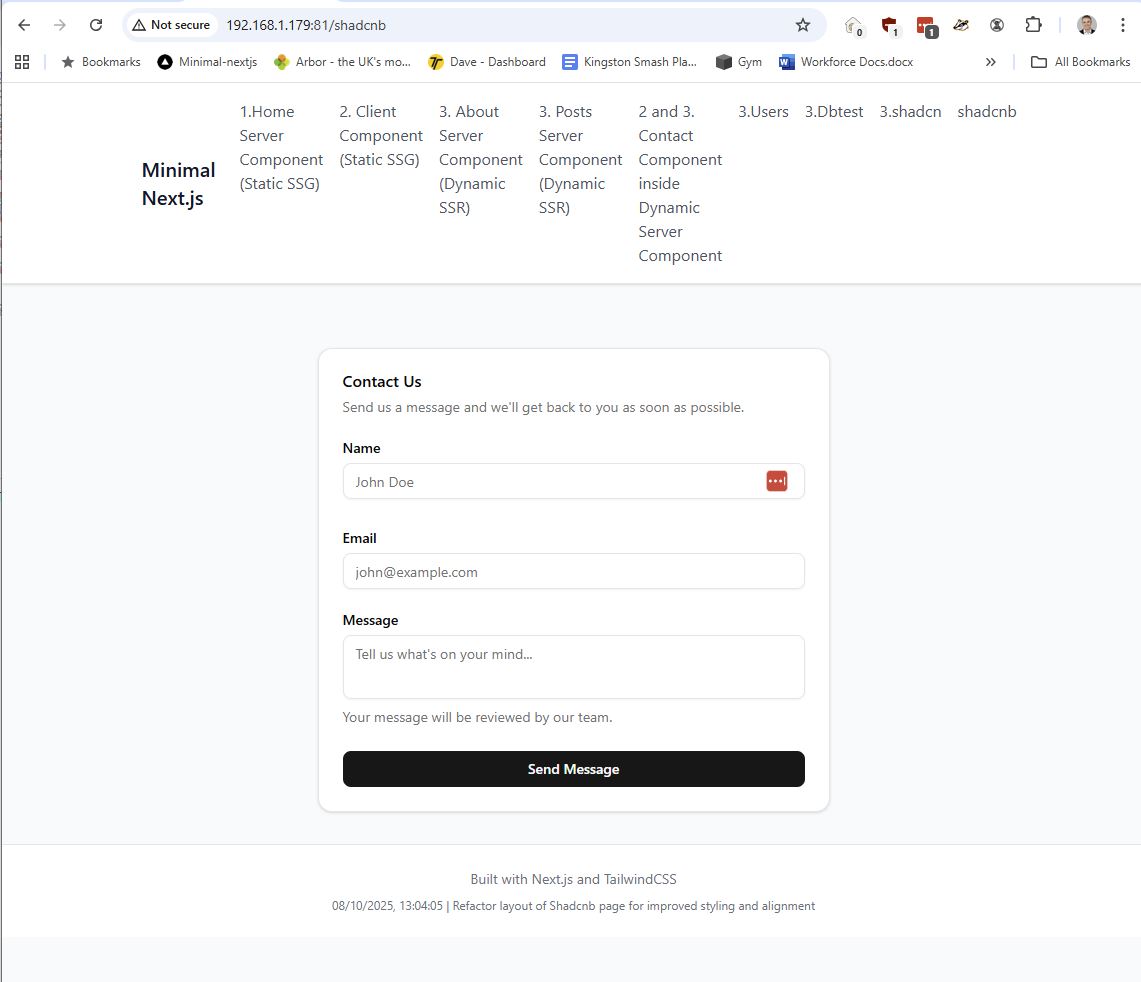
Firstly this is a client component with use client
-
- react-hook-form for form state management
-
- zod for schema validation
-
- shadcn/ui components for UI
-
- sonner for toast notifications
I got lots of errors using http://192.168.1.179:81/ - my browser extension getting confused with another site on this ip and throwing browser console errors, so am using the http://pfsense2:81/ for now
- Card
- Form
Now trying to understand all parts of the code.
- head towards simplest possible
- want to do server side call to write to db, send emails etc..
Version Mismatch
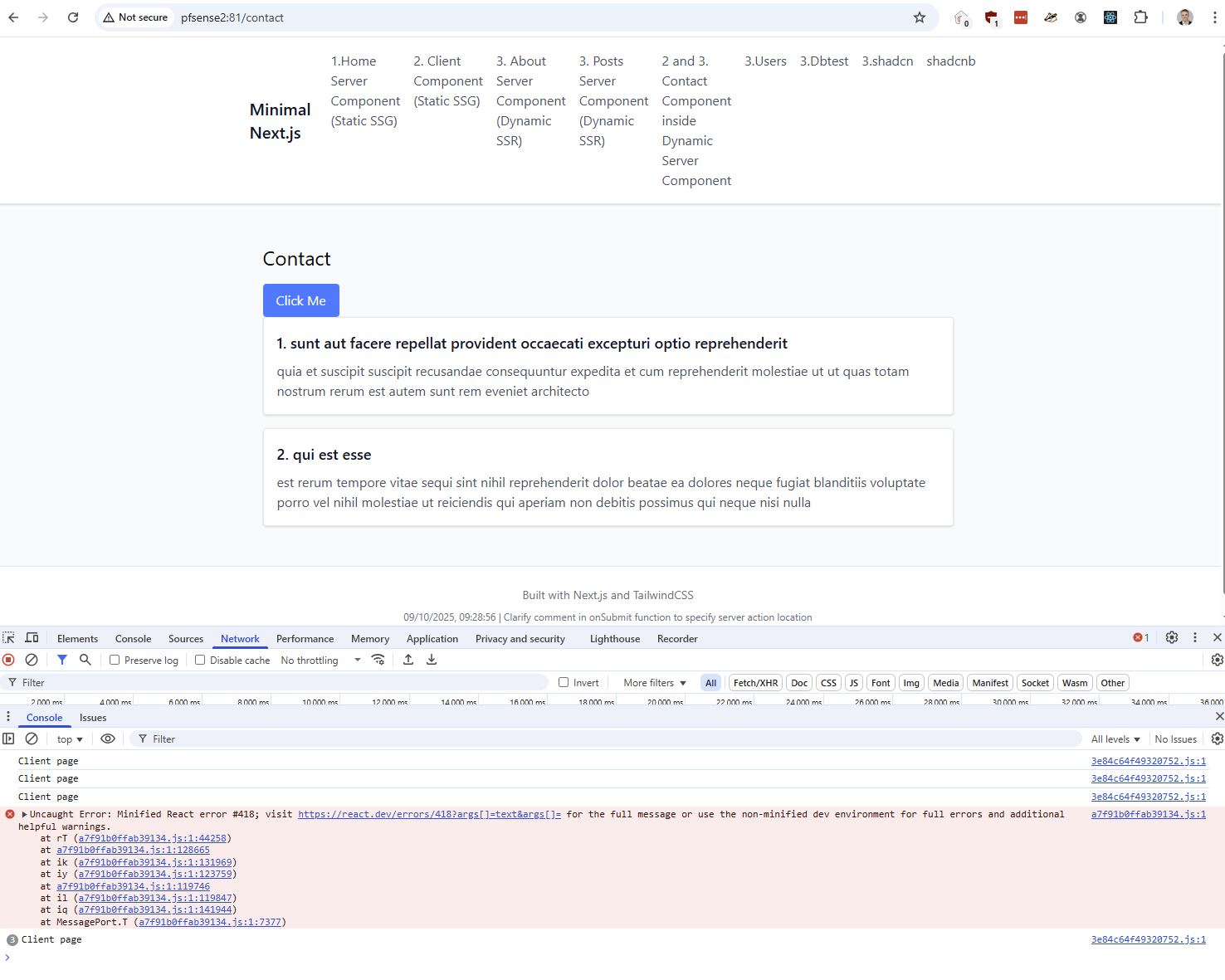
I deployed a newer version to the server and this confused the client, but it did seem to recover and all pages are now using the latest version.
Server
Lets get a simple server log to console working first.
- What is the actions.ts strategy?
React-hook-form
Installed with Form shadcn as this component uses it
RHF handles
- Form state (tracking input values)
- Validation
- Error message
- Form submittion
Lets try using without using the Form wrapper?
Custom slash command to help with git commit message
found that it is a bit slow (claude) for commit messages and I’m out of free credits
/cp
Kill old session
When terminal sessions get stopped (zombied) it is useful when reconnecting to kill off the old session in the ./go.sh script.
# sudo apt install -y net-tools
sudo netstat -tulnp | grep 3000 | awk '{print $7}' | cut -d'/' -f1 | xargs -r sudo kill -9
Chrome devtools mcp
// .mcp.json
{
  "mcpServers": {
    "shadcn": {
      "command": "npx",
      "args": ["shadcn@latest", "mcp"]
    },
     "chrome-devtools": {
      "command": "npx",
      "args": ["chrome-devtools-mcp@latest"]
    }
  }
}
It seems to be taking snapshots of the page, and iterating back to make sure they work.
go through each page and take snapshots in the test-snapshots directory
go through each page and check for console errors and take snapshots in the test-snapshots directory
CRUD
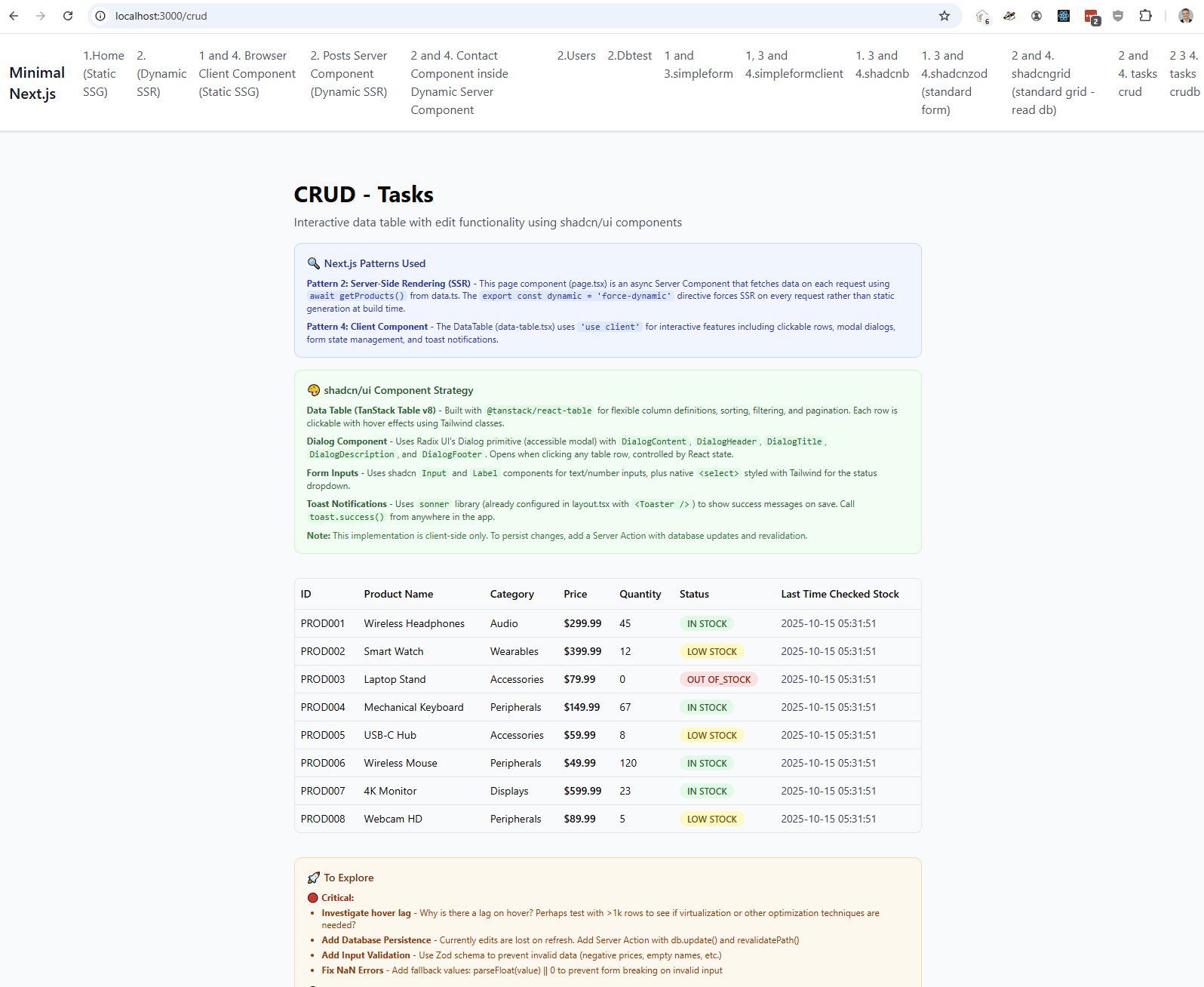
Data Table component (Tanstack Grid) showing products.
https://ui.shadcn.com/docs/components/data-table
Dialog component for Modal
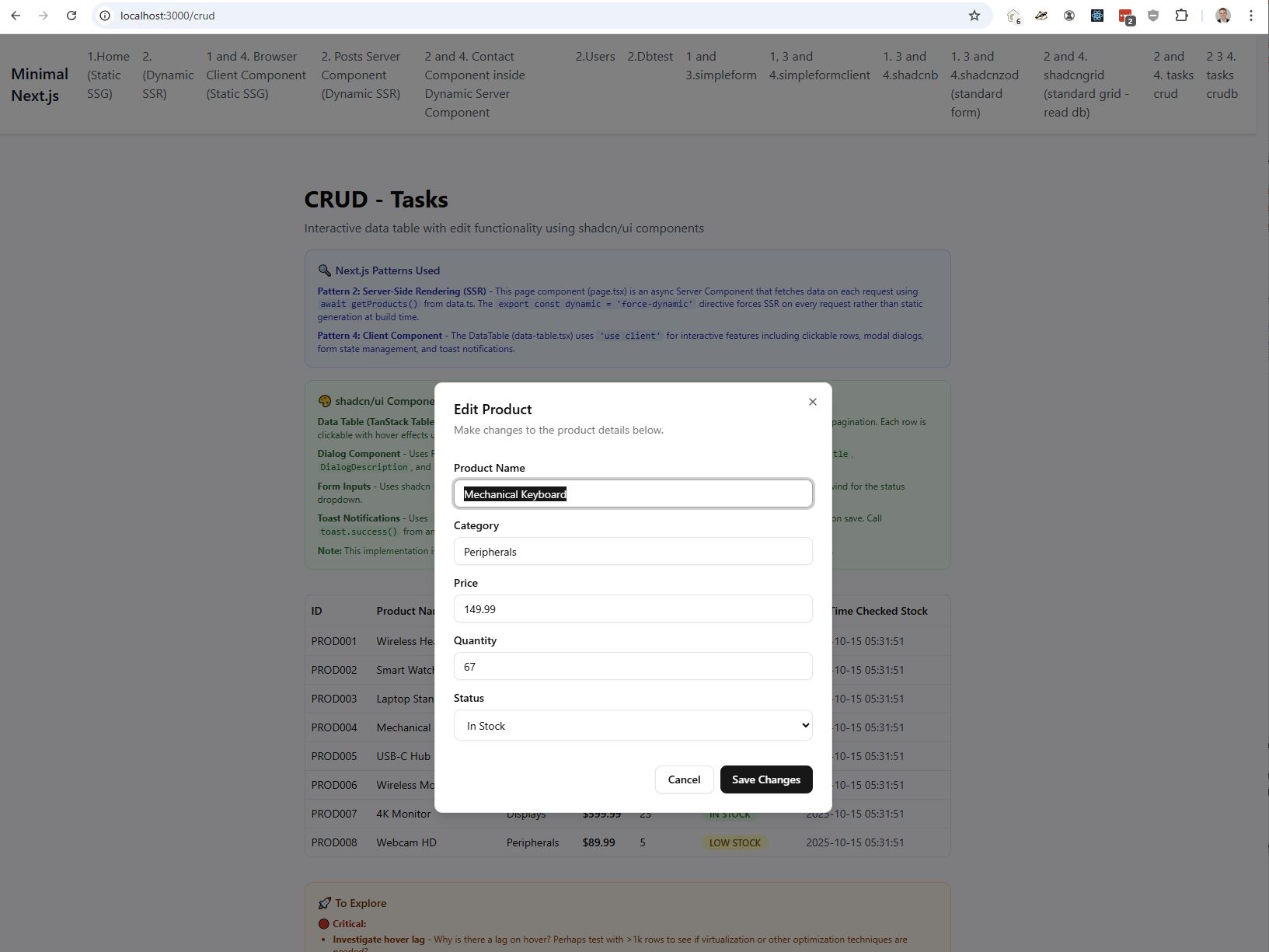
CRUD B
?HERE? simplifying the data table code, and success onclick
detail / edit sdcreens
inline side by side modal
UX Questions
I’ve found myself asking what are the best practises for a crud style application using next.js?
I’ve got a backend style which I like (minimal, fast etc..)
But what are great examples?
https://nextjs.org/learn features
- dashboard style
- gradi with filter, order?, paging
- modal create
- modal edit and delete
Is Next.js the right choice for a business crud app?
hmmmm - should I be doing this all in next.js / react? Currently not really my choice as I want to use this tech to make that decision.
https://www.codecademy.com/learn/intro-to-next-js
Laggyness
Even with a simple table of 8 products I’ve noticed that the UI feels laggy which something important I’d like to address.
turns out it was laggy!
- had a conflicting css class which led to a double paint
- changed to darker in table.tsx
- modal took out the animation in and out transitions and now feels instant
Persistence
Let’s get the database working forcussing on
- simplicity
- performance
Error.tsx and global-error.tsx
global-error is the top level
error.tsx would show if for a example there is 1 failed fetch in a single route.
Application error: a server-side exception has occurred while loading 192.168.1.179 (see the server logs for more information).
Digest: 3149050583
style errors
Persistence
Digging into a real life form with a lot of data. Lets do the simplest thing for performance.
Getting .env.development and .env.production wired up correctly.
Pagination
Performance - large dom’s be careful. A few hundred rows should be fine with pagination.
First strategy I tried was with 1200 products and loading all data into browser but only rendering 20 at a time - felt snappy.
However I’ll be dealing with much more data. Maybe 100k rows.
even 100k rows of data was only 27MB.. and JS dealt with it fine.
1m rows gave some issues, which were hard to debug as it was internal to next.js was causing the bottleneck.
So I went with pagination (see crude) using a non-page reload
Filtering
asdf
Upgrade to Next 16
https://nextjs.org/blog/next-16
pnpm install next@latest react@latest react-dom@latest
https://nextjs.org/docs/messages/middleware-to-proxy - rename middleware.ts to proxy.ts
Have got faster build time - 8 seconds to 6 seconds on prod
Sorting
I’ve gone for simple sql based sorting.
- Server Side Rendering for data fetch
- Server Action for form submittion (not implemented)
- Client Component for rendering, routes and modal popup
Authentication (better-auth)
Lets try and get the simplest possible thing working - emailAndPassword
claude mcp add --transport http better-auth https://mcp.chonkie.ai/better-auth/better-auth-builder/mcp
In this new era of llms, lets connect the mcp and try and implement that way! I asked it to do step by step
https://www.better-auth.com/docs/installation
https://www.npmjs.com/package/better-auth
# 1.3.34 on 29th Oct 2025
pnpm add better-auth

# generate a secret
npx @better-auth/cli@latest secret

# Better Auth Secret in .env.development
BETTER_AUTH_SECRET=xxxxxxx
BETTER_AUTH_URL=http://localhost:3000
then in
// lib/auth.ts
import { betterAuth } from "better-auth";
import { Pool } from "pg";

export const auth = betterAuth({
  database: new Pool({
    user: process.env.POSTGRES_USER,
    password: process.env.POSTGRES_PASSWORD,
    host: process.env.POSTGRES_HOST,
    database: process.env.POSTGRES_DATABASE,
    port: parseInt(process.env.POSTGRES_PORT || "5432"),
  }),
  emailAndPassword: {
    enabled: true,
  },
  secret: process.env.BETTER_AUTH_SECRET,
  baseURL: process.env.BETTER_AUTH_URL,
});
Notice that I’m using a Pool here, as this is recommended for auth.
# generate tables
npx @better-auth/cli generate

# creates a better-auth_migrations file which generates the 4 new tables below
npx @better-auth/cli@latest generate
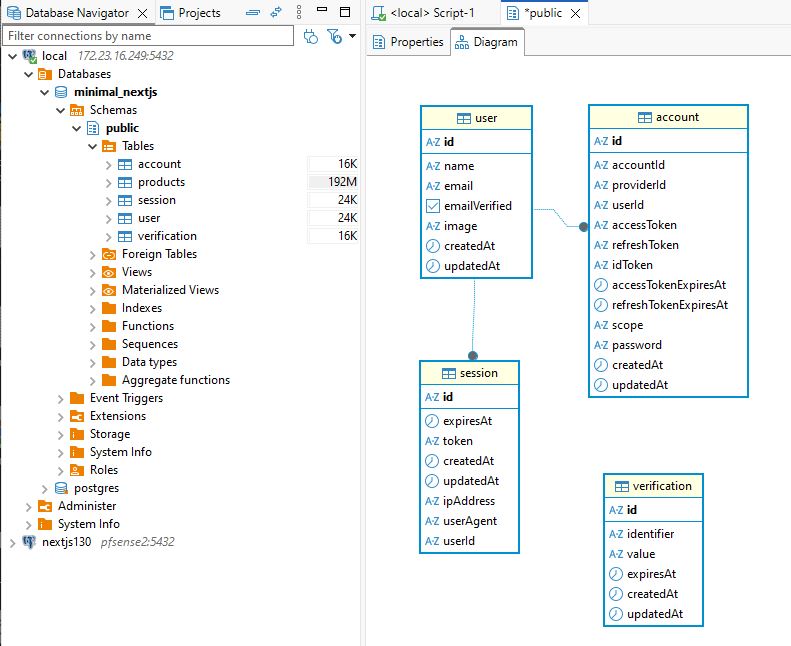
Notice singular for table names. Not canonical for postgres, but am leaving for now.
sudo -i -u postgres
psql
for easy testing.
-- user table a bit annoying as when I do select * from user, it thinks I mean the postgres table and not public.
step 5 - mount handler
// api/auth/[...all]/route.ts
import { auth } from "@/lib/auth";
import { toNextJsHandler } from "better-auth/next-js";

export const { GET, POST } = toNextJsHandler(auth.handler);
A catch all which will handle all better auth api endpoints:
- /api/auth/sign-up/email - User registration
- /api/auth/sign-in/email - User login
- /api/auth/sign-out - User logout
- /api/auth/session - Get current session
- And many more…
The toNextJsHandler() adapter converts Better Auth’s handler to work with Next.js 15 App Router’s route handlers, supporting both GET and POST requests.
step 6 - create auth-client.ts
// lib/auth-client.ts
// will use this in React components


import { createAuthClient } from "better-auth/react";

export const authClient = createAuthClient({
  baseURL: process.env.NEXT_PUBLIC_BETTER_AUTH_URL || "http://localhost:3000",
});
Conclusion
I’m still unconvinced that Next.js is my default for a business CRUD applications when simplicity, debuggability, and operational control are important.
Next.js I believe shines when you want to move fast with UI-heavy features like Flash or Silverlight did ie you don’t worry about Client/Server. That can be incredibly productive.
But for developers (like me.. perhaps old school!) who value boundaries, predictable execution, and production debugging, a simpler architecture React where React is needed, and a conventional backend elsewhere often remains easier to grok.
I’m still willing to be convinced though and feel like I may be missing something… although this is pretty usual for me too :-)